Showing posts with label Security Tips. Show all posts

Kids And Texting - 3 Dangers They May Face


Kids And Texting - 3 Dangers They May Face
Many of my friends communicate with their children via text message. It’s easy for the kids to send a quick message from school or when they are at a friend’s house to update so their parents know what they are up to. In my generation, you didn’t need a cell phone when you were in middle school or high school, but now with families having busy schedules, it almost has become a necessity. Keeping in contact with your kids is the biggest benefit of text messaging. You can see an example of how text messaging was a lifeline to this parent whose child was on lockdown during the Arapaho shooting. Without his child having a cell phone, he would have been in the dark if his child was okay.

Despite some obvious benefits, there are some drawbacks to allowing your kids access to text messaging as well. Here are just 4 dangers that they may face when they have a cell phone and send texts.

Cyber Bullying

It seems like everyday that you turn on the news there is a new story about kids getting bullied or committing suicide because they were bullied. The attacks can come from people they know or even people that they meet on the internet. It’s becoming an epidemic.

Sexting

As kids get older and head into their teens, they start to get curious about their bodies and start wondering about their sexuality. Some teens have started to practice sexting, which involves sending naked pictures or suggestive text to people they know or would like to know. Many scandals have arisen from those text messages getting forwarded. Teens need to work hard to protect their reputations in a digital age and refraining from sexting is one way to do so. Since their relationships are young and volatile, a person who they trust now may be an enemy next week. What’s to stop that person from sharing those private texts that were sent?

Phishing Scams

Another way kids can become victims is through phishing scams. Even with the FCC cracking down, they still exist and kids are easy pray. They usually come in the form of a text message that tricks someone into replying. Once they reply, they are signed up for a premium service and their bill gets charged. They may never know they are being scammed.

Predators

Online predators are everywhere. They lurk on social media, forums and chat rooms. Make sure that your kids aren’t making themselves susceptible to these predators. Tell them to be wary of anyone who they don’t know contacting them online.

What’s the solution? Teach your kids to not give their number out to just anyone. Also, they should never be sharing their phone number on social media sites like Facebook. Unfortunately many have their number on Facebook right on their profile and may not even realize it. Some of those phone numbers show up in their “friends” contacts in their phones. I was surprised when I linked my social media accounts to my phone how many private phone numbers showed up. If their phone number is in their profile someone that they don’t know could be text messaging them.
Image Credit: David Castillo


Author Bio:
Jill Myers is a mom and drivers education instructor. When not helping others learn to drive, she is contributing her knowledge to the blog at Phone Sheriff, parental control software that helps parents keep track of what they are doing online.
Continue Reading

Seven Ways to Prevent Software Viruses from Infecting your Personal Data


Seven Ways to Prevent Software Viruses from Infecting your Personal Data
Computer viruses are manifested through software programs that replicate and infect other computers. Normally these are spread through emails and data transfer devices such as flash disks. Other than infecting your computer or laptop, viruses can be transferred to your cell phone, e-reader or tablet. So long as these gadgets can get into contact with the internet, they are always at risk. A viral attack can lead to a malfunction or expose your personal data such as the passwords you use. If an intruder gets hold of your password he/she can hack into your phone or emails.

There are three basic ways to steer clear of viruses:

  • Avoid opening email attachments from people you don’t know
  • Always use sites that are trusted when downloading files
  • Scan suspect documents or devices that you use

Below are some measures you can take to prevent viruses from getting into your personal data:

1. Exercise caution when opening email attachments either from your phone or tablet. The same way you treat suspect attachments with caution when working from your computer should be replicated in other gadgets. If you get an email from someone who is not in your mailing list, don’t open it. Do the same in case the message title or sender’s name looks suspicious.

2. Be on the lookout for links that look questionable. These are normally sent through text or email messages. The people who send them are spammers or hackers. Some do this on purpose with the intention of establishing whether that email address has a user. Once you open it, some trigger is raised on their end and they get an opportunity to either spam your mail box or send viruses. Others may not be aware that their phones are infected. You can try sending a text to the sender to inquire whether he/she sent the link. If the person is genuine and honest you will get a response and an apology. Otherwise, delete such messages instantly.

3. With respect to applications, download only those that are legitimate. You can tell whether a store is legit by reading online reviews about it. Since there are many people looking for mobile phone applications, some malicious people have taken advantage by spreading viruses in form of fake games, social networking applications and financial tracking apps.

4. While using Bluetooth, apply undiscoverable settings. There are viruses that pass through Bluetooth connections. This is a tricky attack. If you walk near a device and your connection is in discoverable mode, the virus in the infected device can easily be transferred to your tablet or smartphone. Currently, there are some malicious viruses that disable your phone and steal your contact details.

5. In order to protect your smartphones, iPhones, e-readers and tablets download anti-virus applications. These can be obtained from trusted providers. Make sure the company you source the app from is well known. Examples include Lookout Mobile Security app and SmrtGuard Solutions’ Snap Secure app. These help protect iPhones as well as provide data backup. The applications are available from Lookout Inc. There are a host of many others.

6. For Android phones, you should be able to get reliable anti-virus such as Kaspersky Mobile Security app. This incorporates spam and virus protection. Other examples are Norton Mobile Security and Bullguard Mobile Security. These protect data during an attack, theft or loss of your phone. You can download them online.

7. Look for anti-virus applications that help secure your personal information from falling into the wrong hands. Some can help keep track of your phone while others rid your phone’s memory from a remote location. This works well when someone steals your phone.

Image Credit: jesadaphorn


Author Bio:
Agency Fusion, located in Salt Lake City, Utah, is an ad agency focused on the intersection of design and technology. They specialize in web design, web development, branding and software development. Learn more about Fusion Agency here.
Continue Reading

How Private is Google's Incongito Mode?

How Private is Google's Incongito Mode?

With the increase in the number of users of internet globally cyber crimes have also increased remarkably and people should try to be more careful while using the internet than ever before. In the age where almost everyone has access to the internet privacy is one of the most important things that you should worry about while browsing on the internet.

If you are using a public computer for general search like for the schedule of the football world cup fixtures or look for the weather report, privacy is not entirely necessary. But if you are booking a table in a restaurant online, shopping online by using your credit card, checking your bank account, logging into your social media profile or checking your email you need your browsing to be private.

If you are browsing in a public computer you need to be aware that the data you search can easily be accessed by someone else who uses the same computer after you. Mostly people who want their browsing to be private and don’t want anyone to see what they search on the internet remove the history manually after they are done. The traces are removed by clearing the cache and cookie files to completely remove the history. It can also be used specifically for the sites you want to be cleared. They can be removed selectively and the process which does not take much of your time.

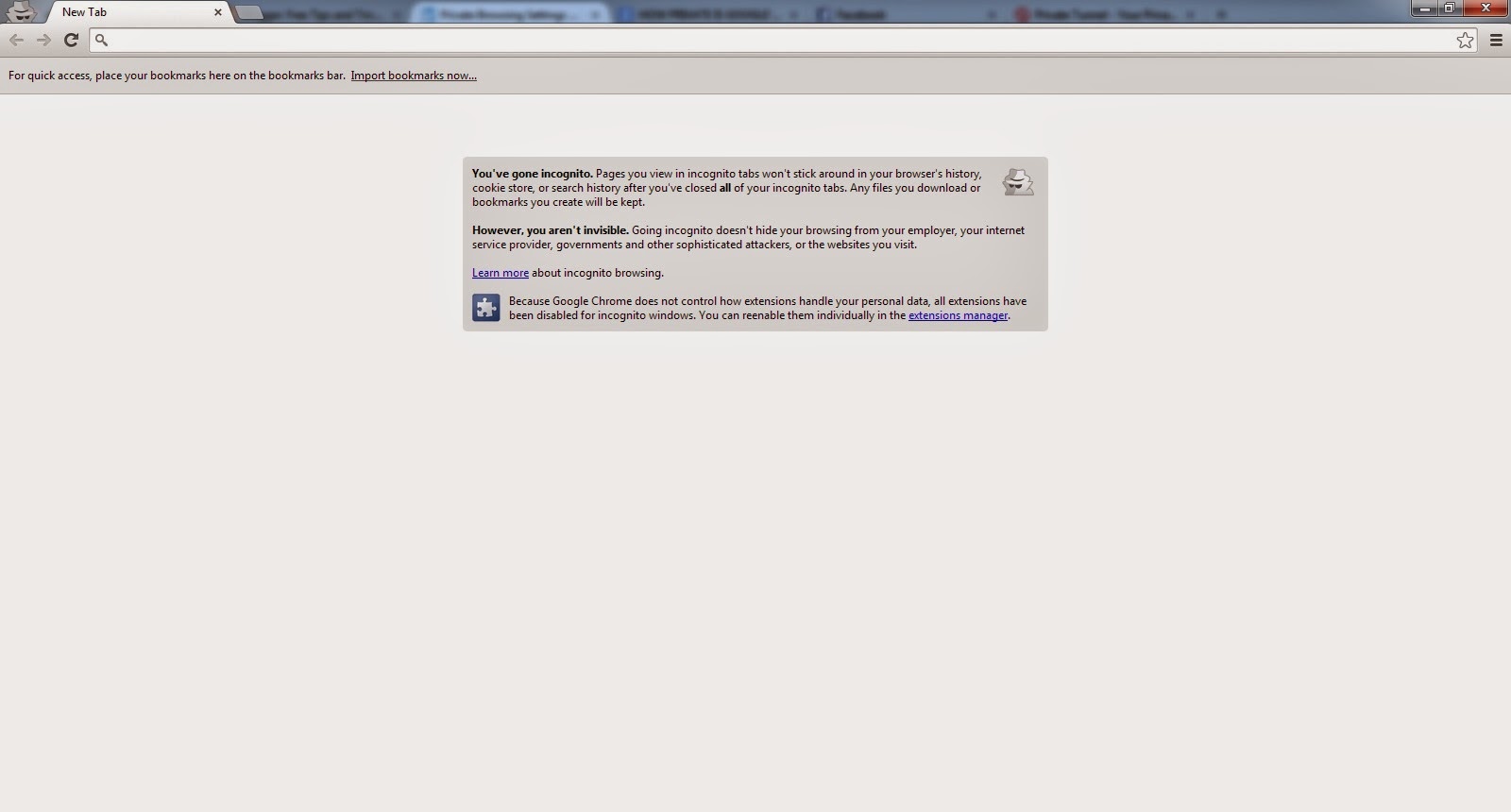
Privacy on the internet is now taken very seriously and most modern browsers ship have a private browsing mode that you can be start independently. This helps to avoid keeping the record of the sites visited and the information browsed in that session cannot be restored once the browser is closed.

Private modes of browsing of all the browsers are the same. A new window opens that is independent from the main session. Just like the main session users can open as many sites as they want to open.

There is however a difference between the functioning of Firefox private browsing mode and google chrome's incognito mode.

In google chrome when you close the browser after using the incognito mode the data cannot be restored. Not everyone needs the private mode of browsing as If you search of a website of something that you need and after finding it you close the window than this information that you searched cannot be restored and if you do not remember the exact site that you searched you cannot reopen it as the data is not saved.

But in Firefox this feature is different. In Firefox data can be restored in the same way just like in the normal browser which is by using ctrl+shift-t. It can also be achieved by right click on the tab bar and undo close tabs from the context menu.

Other browser like opera and internet explorer also use private browsing. Opera is chromium based so its private browsing mode is just like that of google chrome’s incognito and the closed tab cannot be restored while internet explorer handles private browsing just like Firefox.

Comparing these browsers and their private browsing a question arises that is why these applications are different in re-opening the tabs once after they are closed. There is no official answer to this but an appropriate and logical reason can be that the browser that can re-open the closed tabs holds data on a window level while the browsers that cannot re-open the closed tabs in incognito mode like google chrome and opera hold data on tab level.

It makes google chrome’s incognito mode more private as there is no restoration of a tab once after it is closed.


Author Bio:
Brooke fill in as Parental and Tech expert and writer has earned her an exhibited accumulating of readers who are needing for the most recent news and audit about Tech updates. Her work turns around the most recent in spy app for mobile phones like Mobile Tracker.
Continue Reading

5 Best VPNs for Torrents and P2P File Sharing

Torrents have become incredibly popular for sharing files online, and as networks continue to grow for P2P file sharing, increasingly more people are tuning in to this massive content sharing system. Of course, there are inherent security risks with any type of file sharing. This, coupled with the fact that the content of torrent files is usually something copyrighted, such as music or movies, is making users look deeper for ways to protect their privacy and stay anonymous.

Most people have at least basic anti-malware software installed on their devices, which is really helpful in screening files that may have viruses tucked away in them somewhere. However, this type of software really doesn’t do anything to secure your actual connection, it just secures your device.

Where there’s a will, there’s a way, and VPNs have answered the call. VPNs - Virtual Private Networks—offer users a secure and anonymous connection, along with global access to any content they want, regardless of their location. Not all VPNs are created equal though, and if you’re frequently downloading and sharing torrent files, you’re going to want a VPN that’s fast enough to get the job done.


Here are the top five VPNs for torrents and P2P file sharing, and how they compare in terms of price and connection quality.

#5. EarthVPN

Monthly Rate: $3.99

EarthVPN is a great, simple way to protect your privacy online. The connection is relatively fast - definitely fast enough for downloads - and the rates are some of the lowest you’ll find. Although the software is simple and the website doesn’t seem like much to look at, these guys offer loads of features and provide one of the better VPNs I’ve seen.

EarthVPN has the strongest 256-bit encryption available, so your connection is secure from snoops and hackers on public networks. You also get unlimited bandwidth, so there’s never any worry about hitting a monthly cap.The software is compatible with all major operating systems, and even allows three simultaneous connections, so you can use it on just about any device. The only real drawback? No live chat support.


#4. TunnelBear

Monthly Rate: $4.99
 

Okay, I am a huge fan of TunnelBear. The prices are low, the software is great, and let’s face it, the TunnelBear marketing gimmick is downright cute. These guys really know how to sell a product, and their product is awesome all the same.

TunnelBear’s encryption is tough stuff—256-bit and military grade, with settings in the software that you can use to optimize your connection for speed versus security. While TunnelBear is not compatible with Linux, it works on just about everything else—Windows, Mac, Android and iOS.What I love about TunnelBear is how easy it is to use. There is no manual connection configuration and no compressed files to mess with. It’s a simple download and install procedure. To top it all off, they even offer a free version to take for a spin before you sign up for a service plan.


#3. HideMyAss

Monthly Rate: $9.99

Where HideMyAss really shines is its server network. Often, the speed of your connection can really be impacted by the number of servers a VPN has. Too few and there’s not enough bandwidth to go around, not enough locations and you can have a hard time establishing a reliable connection. However, with servers in 190 countries, HideMyAss has one of the largest networks in the world.

With HideMyAss you get software that is compatible with just about every operating system but Linux. You can also use their software simultaneously on up to two devices.The customer support is really comprehensive too, with 24/7 help available on their live chat, phone and e-mail support lines. With unlimited bandwidth and a 30-day, money-back guarantee, there’s not much to lose by giving these guys a try.


#2. IPVanish

Monthly Rate: $10.00

IPVanish is another great VPN to try, with unlimited bandwidth and up to two simultaneous connections under one account. The one major drawback with these guys is that their software isn’t compatible with iOS, so mobile Apple users won’t have much use for it.

However, they do offer 24/7 customer support, with a live chat feature on their website you can use for immediate assistance and an e-mail ticket system for less pressing issues. Plus, they offer a 7-day refund policy for customers who do not find the service works well for them.


Like most other VPNs, IPVanish offers unlimited bandwidth and 256-bit encryption, plus a huge network of servers. Their network includes locations in 60 countries, so wherever you are, you should be able to connect with IPVanish.


#1. ExpressVPN

Monthly Rate: $12.95

ExpressVPN is definitely the best VPN I’ve ever seen. The software is incredibly simple and user-friendly, and the support staff is awesome when you need some assistance. They have the standard e-mail and live chat support, but what’s really incredible is that they usually get back to you within 20 minutes of sending them an e-mail—totally unheard of in this business.

The software works on all operating systems, including Linux, so you can use it seamlessly on all of your devices. It allows two simultaneous connections too—one on a mobile device and one on a home connection.

They offer a rock solid 30-day, money-back guarantee and will give you a refund—no questions asked—if you decide their service isn’t for you. If you do decide to keep it, you can even get a month of free service for you and a friend through their unique referral program.

Their connection is lightning fast, thanks to their massive server network, and with unlimited bandwidth, you’ll never have to worry about too many torrent downloads. Hands down, ExpressVPN is absolutely the best VPN for the job, and worth every penny.

Even if you only do your file sharing at home, most countries have government surveillance programs for internet users, so your connection is anything but anonymous. With a VPN, you get an IP address and access to remote servers to make your connection totally untraceable back to you. ExpressVPN is, in my opinion, the best VPN to keep you protected.

If you’re on public networks frequently, this software is particularly indispensable. These networks are absolute hotbeds of criminal activity, and hackers specifically target them to infiltrate your connection and steal your information. With an encrypted tunnel for your web traffic, your information stays secure from your device to the server.There’s no need to get paranoid and modify your routine—share away, my friends. But messing with torrent files can be a bit like a virtual game of hot potato, so be smart. Protect your devices with anti-malware software, and always use a VPN to keep things private and anonymous.
Continue Reading

Password Management Strategies Do Not Have To Be Complicated


Password Management Strategies Do Not Have To Be Complicated
Despite advances in cyber security, passwords are still the best first line of defense against account infiltration because of their fluid customization. If an account becomes compromised, it is relatively easy for users to reestablish their defenses by changing how it is protected.

News outlets are regularly reporting tales of hacker devastation due to inefficient passcode strength. Although it is simple for users to change their passwords and optimize their security measures, according to PCWorld, there are simple strategies that businesses and consumers alike can consider in order to optimize their defenses from the start.

Tips for password fortification

Business 2 Community reported that password management software can do the work of creating complex and hard to hack passcodes without forcing the end user to memorize long strings of characters, across multiple accounts. With this cost-effective solution, the software will do this work for the customer, requiring minimal setup or maintenance. Furthermore, for businesses that need to manage various online presences over different account names, password management software provides users with an easy to use administrative interface.

Single sign-on solutions (SSO) are also worthwhile investments because of their instant authentication capabilities. When this software is deployed, users can connect to their accounts instantly, without requiring troublesome and often frustrating reset validations. Additionally, this strategy prevents business professionals who manage multiple password-protected accounts from having to spend time constantly signing into them as they perform their daily tasks.

There can never be enough security when dealing with the Internet. People who are invested in preserving their online identity should consider these optimized password strategies.
Continue Reading

Tips for Better Online Shopping

Shopping online has become a modern trend as it eliminates the need for waiting in long queue for purchasing a product online. Some worry that their credit card details may be given to a wrong person. Some believe that shopping online is better and safer than shopping in person or over the telephone. With the e-stores offering Free home delivery, Product replacement, etc., Online shopping has become a most preferred way of shopping nowadays. Here are some tips for a better shopping experience online.

Be Secure:

Be Secure
Millions of dollars are spend everyday in online shopping over the world. There are people who are trying to steal some from it, Be sure you are not a victim to them. When visiting a site to purchase anything online, ensure that the site is secure. Nowadays Phishing attacks are getting popular as shopping online is getting popular. So to ensure that the page you are visiting is secure, look for a tiny padlock icon over the beginning of the url in your browser's address bar. Also the site is secure if there is "s" as "https" and not "http" as seen on the picture.

Paying with Credit or Debit Card?


Paying with Credit or Debit Card
When shopping online, sites offer different modes of payment. Among them Credit and Debit card are the most preferred way by people. And here comes another question on what mode of payment to prefer, Credit or Debit card? It's advisable to prefer Credit card rather than Debit Card. Because Debit card draw directly from your bank account, so in case if your debit card details get in wrong hands, they may do much more damages to your finances than in the case of Credit card. So, prefer credit card for payment when shopping online.

Nowadays most credit card companies offer single-use credit card numbers for the purpose of online shopping, that expires after a single purchase, avoiding being misused even if the credit card details get's into wrong hand. And only the credit card company knows the account that these credit cards are linked to.

Shopping with Coupon Codes:

Shopping with Coupon Codes
Hope you got some idea on choosing secure sites and making secure payments online. Now let's look into the way of purchasing your favorite products with reduced price online. Yes it's possible! Earlier we got coupons through newspaper, magazines or through our nearest store to avail discount when purchasing something.

Now with the advent of Technology/ Electronic coupons, it's possible to purchase your favorite products online at reduced/discount price. First you need to find a Coupon providing website. Then access the shopping website (where you want to use the coupon) through the coupon providing site. And select a deal to get the coupon code. Use those coupons or deals  during the checkout process on the shopping website to avail the discount.

Some final tips to be more secure:

  • Add a Phishing filter to your browser as extension to avoid being a victim to phishing scams. These filter warn you when entering a insecure site. A simple google search will yield you with various phishing filters to compatible with your browser.
  • When purchasing online, use credit card with online fraud protection. Many credit card company offers protection against purchases made with your credit card without your consent.
  • Always keep a record of the purchase details that includes the time, date, receipt number, and order confirmation. It's better to take a hard copy of it.
  • Email scams are increasing nowadays, So be aware of them. Never reply to mails asking your credit/debit card details to send money to your account.

Hope you had some idea on making your online shopping a Better one :) See you in next post buddies..
Image credit: iosphere, stuartmiles
Continue Reading